

By: Mohsin Farooq
Expertise: 8+ years on all three platforms
Last Updated: June 2026
Read Time: 16 minutes
Introduction
If you’re starting freelancing, you face a critical decision: Which platform should you use?
The answer: “It depends.”
But that’s not helpful when you need to decide TODAY.
I’ve earned thousands on all three platforms. Upwork, Fiverr, and PeoplePerHour. I’ve watched hundreds of freelancers succeed and fail on each.
I know which platform pays best, which is easiest to start, which has the best clients, and which you should actually use based on your situation.
This comparison cuts through the marketing hype and gives you real data.
Quick Comparison Table
| Feature | Upwork | Fiverr | PeoplePerHour |
|---|---|---|---|
| Startup ease | Hard (no reviews) | Easy (can get first client fast) | Medium |
| First client timeline | 2-4 weeks | 1-3 weeks | 2-3 weeks |
| Client quality | High (serious businesses) | Medium (mix of serious and bargain hunters) | Medium-High |
| Average earnings | $500-2,000/month | $200-1,000/month | $300-1,500/month |
| Fee structure | 10-20% per project | 20% flat | 10-15% per project |
| Minimum payout | $10 | $15 | $10 |
| Best for | Long-term, higher rates | Quick starts, building portfolio | Ongoing retainers |
| Easiest to scale | Upwork (higher rates) | Fiverr (volume) | PeoplePerHour (retainers) |
Platform #1: Upwork
What Upwork Is
Upwork is a freelance marketplace where clients post jobs and freelancers bid on them. You compete for work. Clients choose who to hire based on your profile, proposal quality, and previous work.
Headquarters: San Francisco, CA
Founded: 2015 (merger of oDesk and Elance)
Users: 18+ million freelancers, 5+ million clients
How Upwork Works
- Client posts job (“I need a blog post written”)
- You submit proposal (explaining why you’re a fit)
- Client reviews proposals (sees yours among 50-300 others)
- Client hires you (if your proposal wins)
- You complete work (using Upwork’s platform)
- Client reviews you (review appears on your profile)
- You get paid (minus Upwork’s fee)


Upwork Pros
Pro #1: Higher budgets Clients on Upwork have serious money. Projects range $500-10,000+. Your average project pays more than Fiverr.
Pro #2: You control pricing You set your own rates. No artificial “$5 minimum.” You decide what your work is worth.
Pro #3: Better client quality Serious businesses use Upwork. Not perfect, but better than Fiverr’s mix.
Pro #4: Your portfolio shows value As your portfolio grows, you can charge premium rates. A freelancer with 100 5-star reviews can charge 3x what a beginner charges.
Pro #5: Long-term relationships Upwork clients often hire the same freelancer repeatedly. You build recurring revenue.
Upwork Cons
Con #1: Hard to land first client With zero reviews, competing against 200 other proposals is brutal. Most beginners get rejected.
Con #2: Steep learning curve Upwork’s system is complex. You need to understand proposals, profiles, bidding strategy. Takes time to learn.
Con #3: High competition For popular skills (writing, design, development), competition is fierce. You need a differentiated profile to win.
Con #4: Bidding fees You pay to bid on jobs (10-20 credits per proposal). If you submit 20 proposals and get 0 hires, you’ve paid $20-40 for nothing.
Con #5: Time between jobs If you’re between clients, there’s downtime. No guaranteed income.
Upwork Earnings Reality
Month 1: $0-300 (learning, building profile, maybe 1 small job)
Month 2: $200-600 (2-3 jobs, slightly better rates)
Month 3: $400-1,000 (established, repeat clients, better proposals)
Month 6: $1,000-3,000+ (premium rates, some retainer clients)
Year 1 typical: $5,000-15,000 total
Experienced freelancers (2+ years): $2,000-8,000/month


Upwork Best For
- Freelancers with proven skills
- People who can write compelling proposals
- Those targeting high-value projects
- Building long-term client relationships
- Serious freelancers (not side hustlers)
Platform #2: Fiverr
What Fiverr Is
Fiverr is a freelance marketplace where YOU create gigs (services) and clients come to you. You don’t bid on jobs—you showcase what you offer.
Headquarters: Tel Aviv, Israel
Founded: 2010
Users: 14+ million freelancers, 10+ million clients
How Fiverr Works
- You create gig (“I will write a 500-word blog post”)
- You set price ($25, $50, $100, etc.)
- Clients browse gigs (search for what they need)
- Client orders from you (directly, no bidding)
- You deliver work (using Fiverr’s platform)
- Client reviews you (review appears on your profile)
- You get paid (minus Fiverr’s fee)


Fiverr Pros
Pro #1: Easiest to land first client You don’t compete on proposals. If someone wants your service, they order. First client comes faster on Fiverr (1-3 weeks) than Upwork.
Pro #2: No bidding fees Create unlimited gigs. No cost per attempt. You only pay when you get hired (20% fee).
Pro #3: Passive income potential Gigs stay live forever. Someone could order you weeks after you created the gig. Less active hustle.
Pro #4: Easier to scale through volume You can take many small projects ($25-50 each) and make decent money through quantity.
Pro #5: Beginner-friendly Fiverr is designed for beginners. Simple setup. Clear process.
Fiverr Cons
Con #1: Low starting prices To get reviews, you start at $5-15. That’s painful. Very low hourly rates.
Con #2: Hard to raise prices Even after 100 reviews, clients expect low prices. Raising prices often loses you volume.
Con #3: Lower quality clients Some Fiverr clients are cheap and difficult. They want $5 for $100 of work.
Con #4: Limited earning potential Even successful Fiverr sellers cap out around $1,000-2,000/month. Hard to break past that unless you’re doing volume (10-20 gigs/week).
Con #5: Algorithm dependency Your visibility depends on Fiverr’s algorithm. You can’t control it. If algorithm changes, earnings drop.
Fiverr Earnings Reality
Month 1: $20-100 (1-5 small gigs at low prices)
Month 2: $100-300 (more visibility, 5-10 gigs)
Month 3: $200-600 (established gigs, repeat clients)
Month 6: $400-1,200 (optimized gigs, good pricing)
Year 1 typical: $2,000-8,000 total
Experienced sellers (2+ years): $1,000-3,000/month


Fiverr Best For
- Beginners (easier start)
- Volume workers (can take many small projects)
- Service sellers with fixed-price offerings
- Building portfolio quickly
- Side hustlers
Platform #3: PeoplePerHour
What PeoplePerHour Is
PeoplePerHour is a freelance marketplace combining elements of both Upwork and Fiverr. You create a profile and can set hourly rates or offer fixed-price projects. Clients either browse or hire you for hourly work.
Headquarters: London, UK
Founded: 2007
Users: 1+ million freelancers, growing client base
How PeoplePerHour Works
- You create profile (similar to Upwork, with hourly rate)
- Clients browse your profile or post jobs
- You bid on jobs OR clients hire you directly
- You work hourly or project-based (your choice)
- Client reviews you
- You get paid (minus PeoplePerHour’s fee)
PeoplePerHour Pros
Pro #1: Less competition 1 million freelancers vs Upwork’s 18 million. Easier to stand out.
Pro #2: Hourly rates are respected Clients expect to pay fair hourly rates. Not the “I want it for cheap” vibe of Fiverr.
Pro #3: Retainer-friendly PeoplePerHour’s system works well for ongoing hourly work. Many retainer clients.
Pro #4: Easier than Upwork, better pay than Fiverr Sweet spot between the two.
Pro #5: Growing platform Less saturated than Upwork/Fiverr. More opportunities if you’re early.
PeoplePerHour Cons
Con #1: Smaller client base Fewer clients = fewer opportunities. You get fewer inquiries than Upwork or Fiverr.
Con #2: Less known Many people don’t know PeoplePerHour exists. Smaller platform = less work.
Con #3: Mid-tier earnings Not as high as Upwork long-term, not as easy as Fiverr. Harder to reach $1,000+/month.
Con #4: Variable quality Mix of good and bad clients, like other platforms.
PeoplePerHour Earnings Reality
Month 1: $0-200 (building, establishing)
Month 2: $150-400 (2-3 projects)
Month 3: $300-700 (growing visibility)
Month 6: $500-1,500 (established, some retainers)
Year 1 typical: $3,000-10,000 total
Experienced freelancers (2+ years): $800-2,500/month
PeoplePerHour Best For
- Hourly rate workers
- Retainer-focused freelancers
- Those wanting less competition
- Seeking work-life balance (hourly = easier to control)


Direct Comparison: Which Platform Pays Most?
Short answer: Upwork pays most per project, but requires more work to land clients.
Long answer:
First 3 months:
- Fiverr wins (easiest to get clients and start earning)
Months 3-12:
- Upwork overtakes (higher rates, better clients)
Year 2+:
- Upwork wins decisively (premium rates, recurring clients)
For volume sellers:
- Fiverr can win through sheer number of gigs
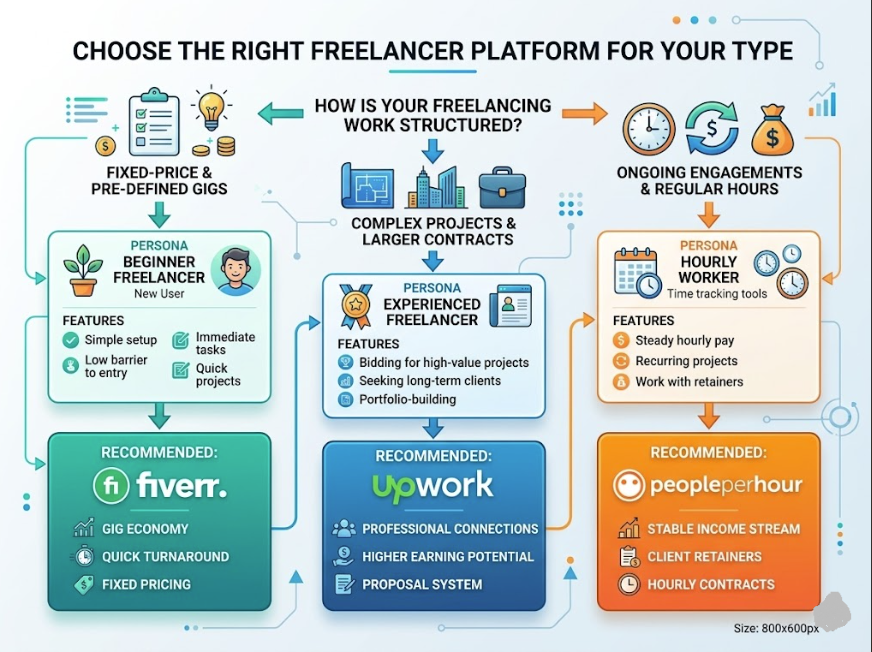
Which Platform Should YOU Use?
Choose Upwork If:
- You want the highest earning potential
- You’re willing to invest 2-4 weeks getting first client
- You can write good proposals
- You’re targeting serious businesses
- You want to build a premium freelance brand
Choose Fiverr If:
- You want fastest path to first client
- You prefer volume over premium pricing
- You’re building a portfolio from scratch
- You want simplicity (no proposals)
- You’re starting as a side hustle
Choose PeoplePerHour If:
- You want hourly work (not projects)
- You want retainer clients
- You’re looking for less competition
- You want sweet spot between Upwork and Fiverr
- You’re comfortable on smaller platform
Choose All Three If:
- You’re serious about freelancing
- You have the bandwidth to manage multiple platforms
- You want diversified income streams
My recommendation: Start with Fiverr (fast wins), then add Upwork after 2-3 months (better income), then consider PeoplePerHour for ongoing hourly work.

Fee Structure Comparison
Upwork
- Freelancer fee: 5-20% depending on earnings
- First $500 with each client: 20%
- $500-$10,000 with same client: 10%
- $10,000+ with same client: 5%
- How you’re paid: Weekly or on-demand withdrawal
- Minimum payout: $10
- Best for: Long-term relationships (lower fees as you work more with same client)
Fiverr
- Seller fee: 20% flat (always)
- How you’re paid: Monthly payout (every month)
- Minimum payout: $15
- Best for: Simplicity (same fee always)
PeoplePerHour
- Freelancer fee: 10-15% depending on tier
- Standard: 15%
- Top rated: 10%
- How you’re paid: Weekly or monthly
- Minimum payout: $10
- Best for: Competitive fees, especially for top-rated sellers
Real Earnings Examples
Example #1: Content Writer
Upwork:
- Month 6: 4 clients, $300-400 per article, 4 articles = $1,200-1,600/month
Fiverr:
- Month 6: 20 clients, $50-75 per article, 20 articles = $1,000-1,500/month
PeoplePerHour:
- Month 6: 2 retainer clients at $25/hour, 40 hours/month = $1,000/month
Winner: Roughly equal, depends on approach
Example #2: Graphic Designer
Upwork:
- Month 6: 3-5 clients, $150-300 per design, 4 designs = $600-1,200/month
Fiverr:
- Month 6: 15-25 clients, $50-100 per design, 20 designs = $1,000-2,000/month
PeoplePerHour:
- Month 6: 1-2 retainer clients at $20/hour, 40 hours/month = $800/month
Winner: Fiverr (volume plays to designer’s advantage)
Example #3: Virtual Assistant
Upwork:
- Month 6: 1-2 retainer clients, $30/hour, 40 hours/month = $1,200-2,400/month
Fiverr:
- Month 6: 5 retainer clients, $15/hour, 100+ hours/month = $1,500+/month
PeoplePerHour:
- Month 6: 2-3 retainer clients, $25/hour, 50-75 hours/month = $1,250-1,875/month
Winner: Upwork (higher hourly rates for VA work)
The Honest Truth
All three platforms work. Your success depends more on YOU than the platform.
What matters:
- Quality of work (matters on all three)
- Communication (matters on all three)
- Pricing strategy (different on each)
- Time investment (Fiverr requires less, Upwork requires more)
A great freelancer makes money on all three. A mediocre freelancer struggles on all three.
The platform is just the marketplace. You’re the product.
Your Action Plan
If you’re just starting:
- Start with Fiverr (fast wins, build confidence)
- Get 10-15 reviews
- Move to Upwork
- Add PeoplePerHour for hourly work
If you’re experienced:
- Use Upwork for main income
- Use Fiverr for supplementary income
- Consider PeoplePerHour for hourly retainers
If you want to optimize:
- Focus on ONE platform for 3 months
- Master it completely
- Then add second platform
- Then third (if needed)
Spreading yourself thin across all three from day one is a mistake.
About the Author
Mohsin Farooq has earned significant income on all three freelance platforms over 8+ years. He’s seen what works, what doesn’t, and how to optimize each platform. He shares real data, not theory.
Which platform are you starting with? Comment below.