

By: Mohsin Farooq
Expertise: 8+ years remote job searching and hiring
Last Updated: June 2026
Read Time: 15 minutes
Introduction
Remote.co is one of the most underrated job boards for finding remote work.
While everyone’s focusing on Indeed and LinkedIn, thousands of remote jobs sit on Remote.co waiting for qualified applicants.
The platform has less competition than the big job boards. Your application stands out more. You have better chances of getting hired.
I’ve used Remote.co to find multiple remote positions and hire remote workers. I know exactly how the platform works, how to stand out, and how to land a job.
This guide shows you everything a beginner needs to know about finding remote jobs on Remote.co.
What Is Remote.co?
Remote.co is a job board exclusively for remote work. Unlike Indeed or LinkedIn (where you filter for “remote”), Remote.co ONLY posts remote positions.
Key details:
- Founded: 2014
- Headquarters: USA
- Jobs posted: 500-2,000 active remote positions daily
- Companies hiring: 2,000+ companies (from startups to Fortune 500)
- Free to search and apply: Yes (no subscription required)
- Website: remote.co
Why it matters: Every single job on Remote.co is a remote position. No filtering. No confusion. Just remote work.
How Remote.co Works
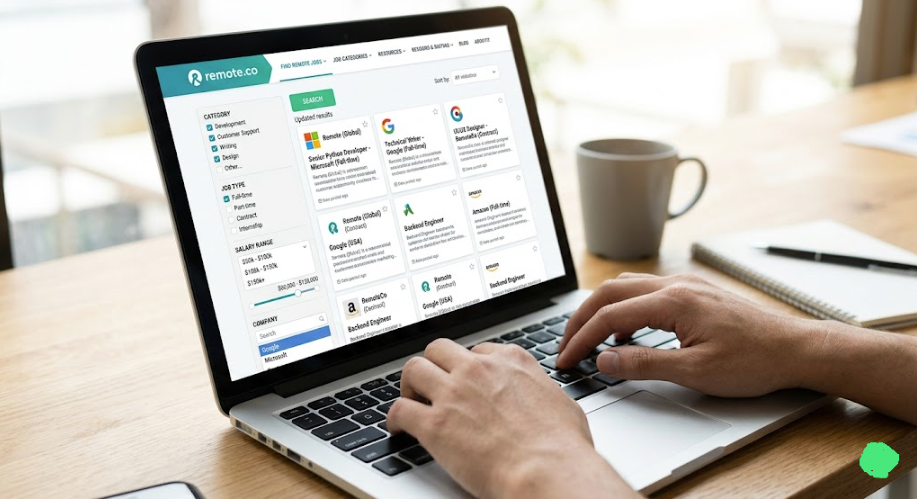
Step 1: Browse remote jobs
- Visit remote.co
- See all remote positions
- Filter by job type, category, company
Step 2: Review job posting
- Read job description
- Check salary range
- Understand requirements
- Review company info
Step 3: Apply to remote job
- Click “Apply”
- Submit resume
- Write brief cover letter
- Send application
Step 4: Get contacted
- Company reviews your application
- They email you if interested
- You interview (usually via video call)
- You negotiate offer
Step 5: Get hired
- Accept job offer
- Sign employment documents
- Start remote position
The process is straightforward. Much simpler than freelancing platforms.


Why Remote.co Is Good for Beginners
Advantage #1: Less competition than Indeed/LinkedIn
On Indeed, searching “remote jobs” returns 100,000+ results. You’re competing with millions of applicants.
On Remote.co, searching same category returns 500-2,000 results. Competition is 95% lower.
Why this matters: Your application actually gets read. You have a real chance.
Advantage #2: Quality companies only
Remote.co has a curation process. Not every company can post. The platform screens for legitimate businesses.
This means fewer scams, fewer bad employers, better quality positions.
Advantage #3: Salary transparency
Most Remote.co job posts include salary range. You know what you’ll earn before applying.
This isn’t common on other job boards.
Advantage #4: Truly remote positions
On Indeed, “remote” sometimes means “remote-friendly” (come to office sometimes).
On Remote.co, remote means fully remote. No office location needed.
Advantage #5: Easier to stand out
With fewer applicants per job, your resume and cover letter get more attention.
A well-written cover letter might be the difference between getting hired or rejected.
Step 1: Create Your Remote.co Profile
Remote.co doesn’t require a formal profile like LinkedIn. But you need:
- Valid email address (you’ll receive job alerts and notifications)
- Resume (have it ready as PDF)
- Cover letter template (write one to customize for each application)
- LinkedIn profile (optional but helpful—companies may check it)
How to set up job alerts:
- Go to remote.co
- Create free account (email + password)
- Go to “Preferences”
- Select job categories you want
- Choose frequency (daily, weekly, or when new jobs post)
- Save preferences
Now you’ll automatically get notified of new remote jobs matching your interests.
Step 2: Search Remote Jobs on Remote.co
Browsing Categories
Remote.co organizes jobs by category:
- Customer Support (customer service, support specialist)
- Data Entry (data analyst, data entry clerk)
- Design (graphic designer, UI/UX designer)
- Development (software developer, web developer, engineer)
- Marketing (digital marketer, content marketer, SEO specialist)
- Sales (sales representative, account executive)
- Writing (content writer, technical writer, copywriter)
- Business (business analyst, project manager, operations)
- DevOps (DevOps engineer, system administrator)
- Other (miscellaneous roles)
Filtering Your Search
Filter by:
- Job type (Full-time, Part-time, Freelance)
- Category (what type of role)
- Company (search specific employers)
- Salary range (if available)
Pro tip: Set up 2-3 different job alert profiles for different job types.
Example:
- Alert #1: Full-time Customer Support (early morning)
- Alert #2: Full-time Writing (midday)
- Alert #3: Part-time Virtual Assistant (evening)

Step 3: Evaluate Remote Jobs on Remote.co
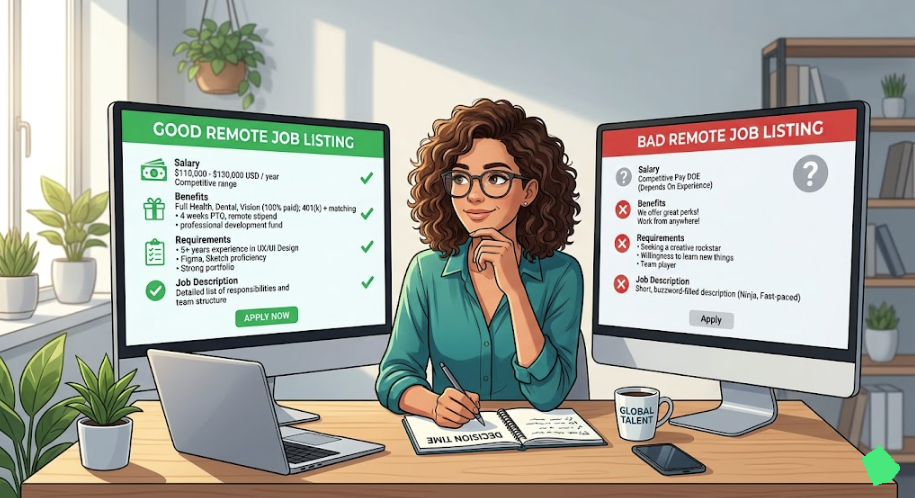
Not all remote jobs on Remote.co are equal. Here’s how to evaluate:
Green Flags (Good signs)
✅ Salary range is listed Legitimate companies post salary ranges. If no salary, they might lowball you.
✅ Job description is detailed Specific description = serious company. Vague description = red flag.
✅ Company has professional website Check company website. Professional = legitimate. Sketchy website = sketchy company.
✅ Clear job requirements Specific skills needed. Clear expectations.
✅ Benefits mentioned Health insurance, retirement, PTO, etc. Serious company.
✅ Time zone mentioned Specific time zone requirements = professional.
Red Flags (Bad signs)
❌ No salary mentioned Could mean they’ll offer below market rate.
❌ Salary range too broad “$30,000-150,000” = vague. Real salary probably lower.
❌ Vague job description “Do various tasks” = unclear job expectations.
❌ Requires upfront payment or software “Buy this software first” = scam.
❌ Pressure to decide immediately “Hire within 24 hours” = red flag.
❌ No company info provided Anonymous job post = suspicious.

Step 4: Apply to Remote Jobs on Remote.co
Your application quality determines if you get hired.
What Remote.co Wants to See
- Professional resume (1-page, focused on relevant experience)
- Cover letter (brief, personalized, shows you read the job)
- Professional email (correct spelling, proper greeting)
Resume Tips for Remote.co Applications
Do:
- ✅ Customize resume for each job
- ✅ Highlight remote work experience (if you have it)
- ✅ Show relevant skills clearly
- ✅ Include quantifiable achievements (“Increased sales 25%”)
- ✅ Keep to 1 page (unless you have 10+ years experience)
Don’t:
- ❌ Use fancy formatting (plain text works best)
- ❌ Include personal info (photo, age, marital status)
- ❌ Use clichés (“I’m a team player”)
- ❌ Make it longer than necessary
- ❌ Use unprofessional email address (not “party_animal@email.com”)
Cover Letter Tips for Remote.co Applications
Structure:
- Paragraph 1: Why you’re interested in THIS specific job
- Paragraph 2: Why you’re qualified for THIS specific company
- Paragraph 3: What you’ll bring + call to action
Example:
“Dear [Hiring Manager Name],
I’m interested in your Customer Support Specialist position. I’ve spent 3 years in customer support, focusing on response time and customer satisfaction. I noticed your company values quick turnarounds—that’s exactly my strength.
I’ve reduced average response time from 8 hours to 2 hours in my previous role. I’m organized, reliable, and passionate about solving customer problems. I work best independently (perfect for remote), and I’m experienced with your support software (Zendesk).
I’d love to discuss how I can help your team deliver excellent customer experiences. I’m available to start within 2 weeks.
Best regards, [Your Name]”
Why this works:
- Shows you read the job posting
- Mentions specific skills they need
- Shows relevant experience
- Shows you understand remote work
- Has a call to action


Step 5: Interview Process for Remote.co Jobs
Interview Structure
Round 1: Phone/Video screening
- 15-30 minutes
- Hiring manager asks about background
- You ask questions about role
- Usually informal, conversational
Round 2: Technical test (if applicable)
- For technical roles (developer, data analyst, etc.)
- You might do a test or coding challenge
- Usually 1-2 hours
Round 3: Final interview
- Deeper conversation
- Meet potential manager/team
- Discuss role details, compensation
- Usually 30-60 minutes
Round 4: Offer
- They extend offer
- You negotiate (salary, start date, etc.)
- You accept or decline
Interview Tips for Remote Positions
Before interview:
- ✅ Research company thoroughly
- ✅ Test your video/audio (camera, microphone)
- ✅ Set up quiet, professional background
- ✅ Prepare 5-10 questions about role/company
- ✅ Have resume in front of you
During interview:
- ✅ Arrive 5 minutes early (for video calls, log in early)
- ✅ Make eye contact (look at camera)
- ✅ Speak clearly and at normal pace
- ✅ Show enthusiasm for remote work
- ✅ Ask about team, company culture, growth opportunities
After interview:
- ✅ Send thank you email within 24 hours
- ✅ Mention something specific from conversation
- ✅ Reiterate your interest


Step 6: Salary Negotiation for Remote.co Jobs
Remote jobs on Remote.co often have posted salary ranges. But you can still negotiate.
How to Negotiate
Step 1: Get the offer They offer you job. Usually includes salary.
Step 2: Don’t accept immediately Say: “Thank you for the offer. I’d like 24-48 hours to review and get back to you.”
Step 3: Research salary Use Glassdoor, PayScale, or Levels.fyi to research similar roles.
Step 4: Negotiate thoughtfully If offered $45,000 and research shows $50,000 is fair: “Thank you for the offer of $45,000. Based on my experience and research of similar roles, I believe $50,000 is fair. Is that possible?”
Step 5: Find middle ground They might counteroffer $48,000. You decide if acceptable.
What You Can Negotiate
✅ Salary (always try) ✅ Start date (if they need flexibility) ✅ Signing bonus (for experienced candidates) ✅ Remote flexibility (work hours, time zone) ✅ Benefits (health insurance, PTO)
❌ Don’t negotiate: Job title, role responsibilities (usually fixed)
Remote Jobs on Remote.co: Real Salary Data
Customer Support
Salary range: $25,000-45,000 Typical: $28,000-35,000 Job requirements: Excellent communication, patience Time to hire: 1-3 weeks
What companies look for:
- Customer service experience (or eagerness to learn)
- Clear communication
- Reliability
- Patience with difficult customers
Data Entry
Salary range: $22,000-38,000 Typical: $24,000-30,000 Job requirements: Accuracy, speed, attention to detail Time to hire: 1-2 weeks
What companies look for:
- Typing speed (40+ WPM)
- Accuracy (minimal errors)
- Organization
- Reliability
Content WritingSalary range: $30,000-60,000 Typical: $35,000-50,000 Job requirements: Strong writing, SEO knowledge, research ability Time to hire: 2-4 weeks
What companies look for:
- Writing samples
- SEO knowledge
- Ability to meet deadlines
- Knowledge of your niche
Software Developer
Salary range: $60,000-150,000 Typical: $80,000-120,000 Job requirements: Programming skills, problem-solving, specific tech stack Time to hire: 2-6 weeks (often multiple interview rounds)
What companies look for:
- Portfolio/GitHub
- Technical skills
- Problem-solving ability
- Communication skills
Marketing Specialist
Salary range: $35,000-70,000 Typical: $40,000-55,000 Job requirements: Marketing knowledge, analytics understanding, writing Time to hire: 2-4 weeks
What companies look for:
- Marketing experience
- Analytics understanding
- Data-driven mindset
- Communication skills
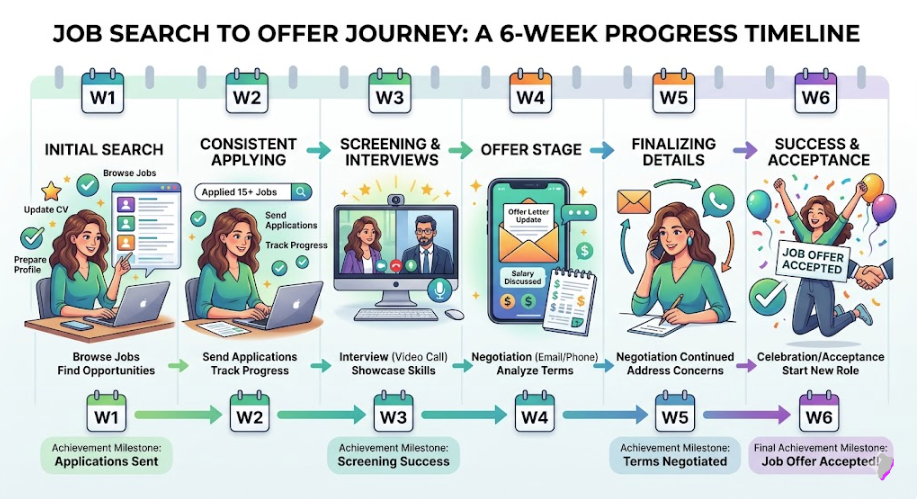
Timeline: From Search to Hired on Remote.co
Week 1:
- Set up Remote.co job alerts
- Prepare resume and cover letters
- Apply to 5-10 jobs
Week 2-3:
- Receive first interview requests
- Have 2-3 interviews
- One company moves to second round
Week 4-5:
- Final interview with top choice
- Receive job offer
- Negotiate salary/start date
Week 6:
- Accept offer
- Sign employment agreement
- Start remote job
Total timeline: 4-6 weeks typically
Common Mistakes When Applying on Remote.co
Mistake #1: Submitting generic resume
Same resume for every job = lower acceptance rate.
Customize each resume to the specific job. Highlight relevant experience first.
Mistake #2: No cover letter
A good cover letter increases your chances 50%+.
Even a brief, personalized cover letter separates you from other applicants.
Mistake #3: Applying to jobs you’re unqualified for
Reading: “5 years required. I have 0 years but I’m eager!”
Don’t. Apply only to jobs where you meet 70%+ of requirements.
Mistake #4: No subject line mention of role
Generic email subject: “Job Application”
Better: “Application: Customer Support Specialist – John Smith”
Shows professionalism.
Mistake #5: Applying and disappearing
You apply, they contact you, you don’t respond.
Check your email daily. Respond within 24 hours to any inquiries.
Remote.co vs. Other Remote Job Boards
| Feature | Remote.co | FlexJobs | We Work Remotely | Indeed |
|---|---|---|---|---|
| Jobs posted | 500-2,000 | 2,000-5,000 | 1,000-3,000 | 100,000+ |
| Competition | Low | Low-Medium | Medium | Very High |
| Quality | High | Very High | High | Mixed |
| Cost | Free | $7-15/month | Free | Free |
| Best for | Beginners | Serious job seekers | Tech roles | General search |
My recommendation:
- Start with Remote.co (free, less competition)
- Also check We Work Remotely (good tech jobs)
- Only use Indeed if Remote.co/other boards don’t work
Your Action Plan
Week 1:
- Go to remote.co
- Create account
- Set up job alerts for 2-3 job categories
- Prepare resume and cover letter template
Week 2:
- Review new remote jobs daily
- Apply to 3-5 quality jobs
- Customize each application
- Check email for responses
Week 3-4:
- Participate in interviews
- Send thank you emails
- Negotiate offers
- Accept job offer
Week 5-6:
- Finalize employment agreement
- Prepare for first day
- Start remote position


Real Example: Getting Hired on Remote.co
Person: Sarah, 25, wanting first remote job
Experience: 2 years customer support in call center
Week 1: Created Remote.co account. Prepared resume highlighting customer support skills. Applied to 5 customer support positions.
Week 2: Received 2 interview requests. Had phone interviews with both companies.
Week 3: One company requested second interview (video call with manager). Interview went well.
Week 4: Received job offer: $32,000/year remote customer support specialist.
Week 5: Negotiated to $35,000 (research showed $33,000-37,000 was fair). Company agreed to $35,000.
Week 6: Started remote position.
Result: Got first remote job in 5 weeks. Better salary than call center job.
Key Takeaways
- Remote.co has less competition than Indeed/LinkedIn
- Quality jobs pay real salaries (not bargain-basement prices)
- Your application quality matters (customize everything)
- Timeline is 4-6 weeks from search to hired
- You can negotiate salary (especially if you have experience)
- Remote work requires reliability (companies expect you to deliver)
About the Author
Mohsin Farooq has used Remote.co to find multiple remote positions and also hired remote workers through the platform. He understands both the job seeker and employer perspective. He shares insider knowledge on how to stand out and get hired.
Ready to find your first remote job on Remote.co? Start today.