

By: Mohsin Farooq
Expertise: 8+ years Upwork freelancing experience
Last Updated: June 2026
Read Time: 15 minutes
Introduction
Getting your first Upwork client feels impossible when you have zero reviews.
You see freelancers with 4.9 stars and hundreds of completed jobs. You see profiles that look professional. You see profiles that have been on Upwork for years.
And you think: “How am I supposed to compete?”
Here’s the truth: You’re not competing with them yet. You’re competing with other beginners.
And beginners lose because they don’t know the Upwork system.
I’ve hired hundreds of freelancers on Upwork. I’ve also built my own Upwork profile from zero to thousands of dollars in earnings. I know exactly what works and what doesn’t.
This guide shows you how to create an Upwork freelancer profile that actually gets clients, and how to land your first Upwork client even with zero experience.
Why Upwork Is Better Than Fiverr for Getting First Client
Before we build your Upwork freelancer profile, understand why Upwork matters:
Upwork advantages:
- Higher budgets (clients have real money)
- Better client quality (serious businesses, not bargain hunters)
- You control pricing (not Fiverr’s $5 minimum)
- Your reputation matters (reviews follow you, visible to all clients)
- More leverage (you choose which jobs to apply for)
Upwork disadvantages:
- Harder to land first job (more competition visible)
- Harder to understand the system (more complex than Fiverr)
- Takes longer to get first client (2-8 weeks typical)
- You pay bidding fees (10-20% per proposal)
The difference: Upwork is harder to start but pays better long-term.
Step 1: Create Your Upwork Freelancer Account
Sign up at: upwork.com
You’ll need:
- Email address
- Valid ID (Upwork requires verification)
- Payment method (to pay bidding fees)
- Phone number (for verification)
Verification takes: 1-3 days
Don’t rush this step. Upwork’s verification is thorough. They want to prevent fraud.
Once verified, you can start building your Upwork freelancer profile.
Step 2: Build Your Upwork Freelancer Profile (The Critical Part)
Your Upwork freelancer profile is your resume, portfolio, and sales pitch combined.
Clients spend 30 seconds reading your profile. If it doesn’t hook them, they move to the next freelancer.
Profile Photo
What to use:
- Professional headshot (you looking at camera)
- Clear face visible
- Good lighting
- Friendly expression
- Plain background preferred
What NOT to use:
- Selfie
- Party photo
- Blurry image
- Photo from 10 years ago
- Cartoon/avatar
Why it matters: People hire people. A real photo builds instant trust. Profiles without photos get 80% fewer invitations.

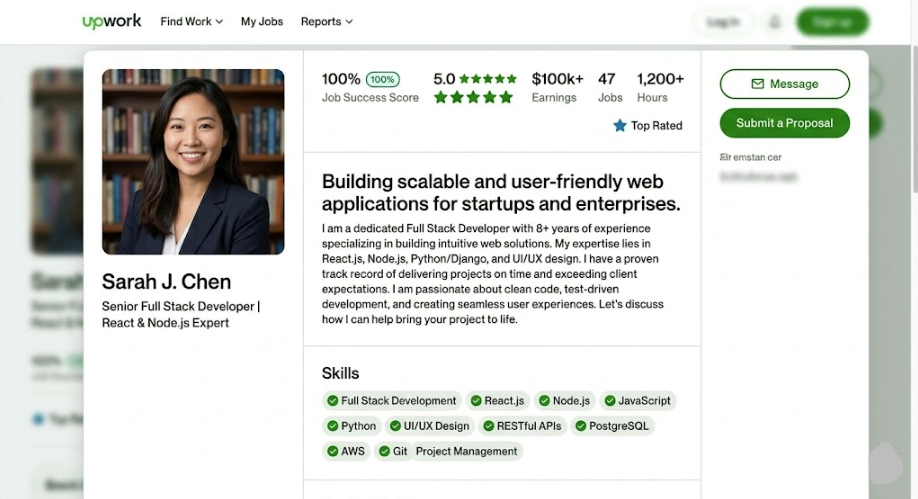
Headline (Ultra Important)
This is the first thing clients see. It determines if they click your profile or move to the next freelancer.
Bad Upwork freelancer headline: “Freelancer” “I offer writing services” “Writer and Editor”
Good Upwork freelancer headline: “Content Writer for SaaS & Tech Startups | 50+ Projects Completed” “Copywriter Specializing in Email & Sales Pages | Conversion-Focused” “Full-Stack Web Developer | React + Node.js | 8 Years Experience”
The formula: [Your specialty] | [What you deliver] | [Social proof or credential]
Why this works: It tells clients immediately who you are, what you do, and why they should hire you.
Upwork Profile Summary (Your Bio)
This is 100-150 words about who you are and what you offer.
Structure:
- Paragraph 1: What you do + who you serve
- Paragraph 2: Why you’re good at it
- Paragraph 3: How you work + your promise
Example (Writing Specialist):
“I’m a content writer specializing in tech and SaaS companies. I write blog posts, landing pages, and email sequences that engage readers and drive conversions.
I’ve written 100+ articles for tech companies, generating thousands of leads through SEO-optimized content. I understand both the writing craft and marketing strategy—every piece I write serves a business goal.
I deliver fast turnarounds, clear communication, and content that performs. I revise until you’re completely satisfied. If you’re looking for a writer who understands your business goals, let’s talk.”
Why this works:
- Shows who you serve (tech companies)
- Shows what you deliver (blog posts, landing pages, emails)
- Shows social proof (100+ articles)
- Shows you understand business goals
- Shows your process (fast, communicative, revision-friendly)
Skills Section
List your top 10 skills in order of relevance to your specialty.
Don’t:
- List 50 skills (looks desperate)
- List skills you don’t actually have
- List random unrelated skills
Do:
- List 8-12 skills you genuinely have
- Put your strongest skill first
- Make them specific (not “writing,” but “Technical Writing” and “Copywriting” separately)
- Include tools you know (WordPress, Figma, etc.)


Portfolio/Work Samples
Clients want to see your work. You have zero clients. So how do you show samples?
Create portfolio pieces:
- Write 3-5 sample pieces in your specialty
- Create case studies (even if fake) showing before/after results
- Upload screenshots of design work
- Show blog posts you’ve written (even for yourself)
For writers:
- Write 2 sample blog posts (1500 words each) for fake companies
- Write 1 sample sales page
- Write 1 sample email sequence
- Upload as PDFs or links
For designers:
- Create 3 sample designs for fake clients
- Show different styles/types
- Include mockups
For developers:
- Link to GitHub projects
- Show live websites you’ve built
- Include code samples
Why this works: Even if they’re not from paying clients, they show you can DO the work. That’s what matters.
Hourly Rate vs. Fixed Price
Hourly: $25-50/hour (for your first jobs) Fixed price: Create fixed-price proposals per project
My recommendation:
- Start with hourly ($30-40/hour) to get first reviews
- After 5+ reviews, switch to fixed-price (where you control pricing)
Why hourly first: Clients are less risky. You get paid for time. You get reviews faster.


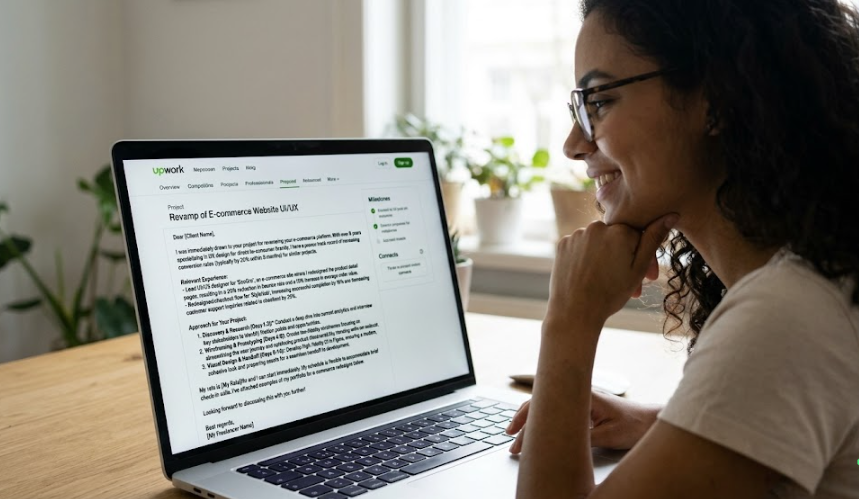
Step 3: Write Your First Upwork Proposals
Your Upwork freelancer profile is built. Now you need clients.
The ONLY way to get clients on Upwork is through proposals. You bid on jobs. Clients choose from bidders.
Proposal quality matters more than price.
How to Find Jobs on Upwork
- Go to Jobs → Browse Jobs
- Filter by your category
- Sort by “Recently Posted” (newest jobs have fewer bids)
- Look for jobs with 2-5 bids (sweet spot—not too competitive, not abandoned)
The Proposal Formula That Works
Most proposals are generic and terrible. Yours will stand out.
Structure:
Subject: [Client’s project name] + quick reason you’re perfect
Example: “SEO Blog Posts for SaaS | 8 Years Content Experience”
Opening paragraph: Show you read and understand the job
❌ Bad: “I can do this project.” ✅ Good: “I read that you need 4 blog posts targeting IT managers. I’ve written 50+ articles in this space, and I understand your audience’s pain points.”
Middle paragraphs: Show what you’ll deliver
“Here’s my approach:
- Research your target keywords and competitors
- Outline each article with your input
- Write SEO-optimized content (no keyword stuffing, natural language)
- Include internal linking strategy
- Deliver with metadata suggestions
I’ll deliver 2 articles per week, with 2 revisions included. Timeline: 4 weeks for all 4 articles.”
Closing paragraph: Show your value + call to action
“I’ve worked with 20+ SaaS companies on content strategy. I don’t just write articles—I write articles that rank in Google and convert readers to leads.
I’d love to discuss your project timeline and goals. When are you looking to launch?”
Why this works:
- Shows you read the job
- Shows exactly what you’ll deliver
- Shows your process
- Shows social proof (20+ companies)
- Shows you understand their goal (ranking, converting)
- Ends with question (invitation to respond)
Proposal Tips
Tip 1: Customize every proposal Don’t copy-paste. Every job is different. Every proposal should be different.
Tip 2: Don’t mention price until asked Your opening proposal should NOT include price. Let them ask. Then you can negotiate or explain value.
Tip 3: Bid on new jobs (fewer bids = higher win rate) A job posted 10 minutes ago has 1 bid. A job posted 3 days ago has 100 bids. Bet on newer jobs.
Tip 4: Apply to 5-10 jobs per day Don’t apply to 50. Quality over quantity.
Tip 5: Follow up after 3 days if no response Send a follow-up message: “Hi, just checking if you had any questions about my proposal. Happy to discuss further.”

Step 4: What Clients Actually Look For in Your Upwork Freelancer Profile
Understanding what clients want helps you optimize your profile.
What clients look at (in order):
- Photo (first impression—do they trust you?)
- Headline (do you match what they need?)
- Rate/Budget fit (can they afford you?)
- Overview section (do you understand their industry?)
- Work samples (can you actually do this?)
- Reviews (what do past clients say?)
For your first client, you have no reviews. So #5 (work samples) becomes critical.
Clients think:
- “No reviews… but the portfolio looks good”
- “They clearly understand my industry”
- “The rate is reasonable for someone starting”
- Result: They might take a chance on you
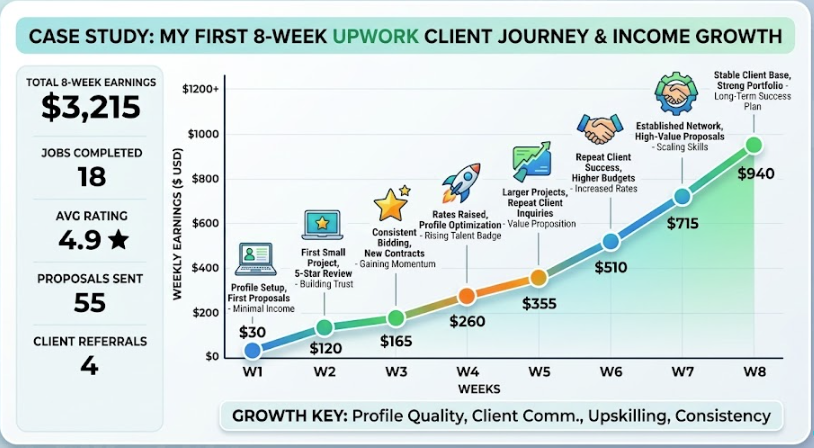
Step 5: Getting Your First Upwork Client (Timeline & Reality)
Week 1:
- Send 30-40 proposals
- Get 0-2 responses
- You’re discouraged
Week 2:
- Send 30-40 more proposals
- Get 2-5 responses
- One client asks a question
Week 3:
- Follow up with responding clients
- One client hires you (finally!)
- Earnings: $100-300 (small first project)
Week 4-8:
- Complete first project excellently
- Get 5-star review
- NOW other clients take you seriously
- Second client comes faster
- Earnings: $300-600/month
Timeline to first client: 2-4 weeks typically
Why so long: Upwork is competitive. You have no proof you’re good. Most clients won’t take that risk initially.

Step 6: Land Your First Client (The Actual Tactics)
Tactic 1: Target Emerging Clients
Look for job posts that are:
- Vague or poorly written (posted by non-native English speaker, possibly new to hiring)
- Low budget but clear scope
- Looking for quick turnaround
These clients are less picky about reviews because they’re desperate.
Tactic 2: Target Specific Industries You Know
If you understand SaaS, bid only on SaaS jobs. If you understand e-commerce, bid only on e-commerce jobs.
Your industry knowledge becomes your advantage over experienced generalists.
Tactic 3: Bid Below Market (Temporarily)
Don’t do this forever. But for your first 3-5 jobs:
Market rate for writing: $100-200 per article Your bid: $75-100 per article
Yes, you’re undercutting. But you need that first review.
After you have 5 reviews, raise your rates 50%.
Tactic 4: Offer a Risk-Free Trial
In your proposal, offer:
“I’m confident in my work, so if you’re not happy with the first article, no charge. Then if you like it, we proceed with the rest of the project at full price.”
This removes their risk. Clients love it.
Tactic 5: Target Clients Hiring Multiple Freelancers
Look for job posts that say:
- “Need 10 articles written”
- “Looking for ongoing writers”
- “Building a team of writers”
These clients need multiple freelancers. You might be #5 choice, but that’s fine—you get hired.
Step 7: Red Flags (Jobs to Avoid)
Even when desperate, avoid these jobs:
Red flag #1: “I need a cheap writer” If the entire job post is about being cheap, they don’t value quality. They’ll leave bad reviews.
Red flag #2: Vague scope with tight deadline “I need content ASAP but haven’t decided what” = Client doesn’t know what they want = You’ll revise forever = Bad review likely
Red flag #3: Extremely low budget $20 for 2000 words = $0.01 per word Skip these. You’ll hate the work.
Red flag #4: Requires upfront payment or software installation Scam jobs. Skip.
Red flag #5: Tests with no budget “Do a free test piece first” No. Say “I’m happy to show samples, but free work isn’t possible.”
Common Mistakes That Kill Your First Upwork Client
Mistake #1: Generic proposals
Sending same proposal to 20 different jobs.
Clients know. They won’t hire you.
Mistake #2: Focusing on you, not them
Your proposal: “I have 10 years experience, I’m reliable, I deliver quality.” Client thinks: “Great, but what about MY project?”
Better: “Your project needs X. I specialize in X. Here’s how I’ll deliver X for you.”
Mistake #3: Asking for too much in first message
Asking questions, asking scope details, asking timeline.
Keep first proposal simple. Answer their job post. That’s it.
Mistake #4: Pricing without understanding the scope
Saying “$50 for an article” without knowing length, topic, research required.
Better: Say “I’ll review scope and provide exact quote” or give range “$75-150 depending on length.”
Mistake #5: Not setting expectations
Client expects fast turnaround. You deliver in 2 weeks. Bad review.
Set expectations upfront: “I’ll deliver within 5 business days.”
Your Upwork Freelancer Profile Checklist
Before you start applying:
- [ ] Professional photo uploaded
- [ ] Strong headline written (includes specialty + social proof)
- [ ] 100-150 word profile summary written
- [ ] 8-12 relevant skills listed
- [ ] 3-5 portfolio pieces uploaded
- [ ] Rate set ($30-50/hour or project-based)
- [ ] 5 sample proposals written (in notepad, ready to customize)
If you check all these, you’re ready.
Real Example: My First Upwork Client
My situation: 8 years ago, zero Upwork history
My first proposal: Applied to writing job, $75 for 1500-word article
Content: Explained I understood their audience (tech startup owners), showed writing samples, said I’d deliver in 4 days
Result: Client hired me (they got lucky—competed against 200 other proposals, I was #150 or so)
First project: Earned $75, worked 5 hours, delivered great article
Client review: 5 stars. “Professional, fast, understood our audience perfectly.”
Impact: That single 5-star review changed everything. Next 10 proposals had much higher acceptance rate.
That’s how it works. First client is hard. Second client is easier. By client #10, clients are requesting you directly.
Timeline to $500/Month on Upwork
Month 1: First client, $75-150 earned, 1 review Month 2: 3-4 clients, $300-500 earned, 3-4 reviews Month 3: 5-6 clients, $600-1,000 earned, 5-6 reviews Month 4+: Established, $1,000-3,000+/month, direct requests coming in
If you execute this properly, $500/month is realistic within 3 months.
Your Action Plan
- Build your Upwork freelancer profile (today, 2-3 hours)
- Get verified (wait 1-3 days)
- Write 5 custom proposals (tomorrow, 1 hour)
- Send 30-40 proposals in week 1 (bid on 5-10 jobs per day)
- Follow up if no responses in 2-3 days
- Accept first decent project (don’t be too picky)
- Deliver excellent work (this is your first review)
- Get 5-star review (now you’re competitive)
- Raise rates and expand
That’s it. That’s the path to your first Upwork client.
About the Author
Mohsin Farooq has earned thousands on Upwork over 8+ years. He’s gone from zero reviews to established freelancer. He’s also hired hundreds of freelancers on Upwork. He knows what works from both sides.
Ready to build your Upwork freelancer profile? Let’s go. You’ve got this.